
Dollarfix+
MATL TECH INC.Auto & Vehicles
4.061.00 Reviews
- Version
- 1.9.2
- Installs
- 500.00K
- Age Rating
- Everyone
Screenshots

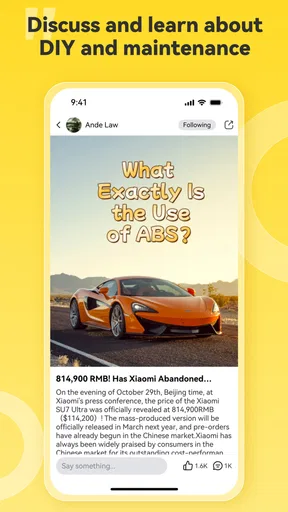



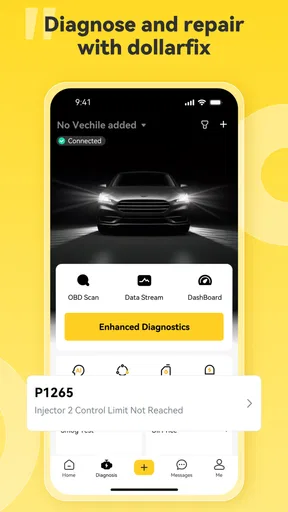
Our Review of Dollarfix+
 Analysis by Appyee
When I look for an automotive app, I want something that reduces small points of friction rather than creating another complicated dashboard to manage. Dollarfix+ takes that practical approach. It is a free Auto & Vehicles app from MATL TECH INC., aimed at putting everyday car-related tasks into one place. After spending time with it, I see the appeal: it feels designed for drivers who want a convenient starting point instead of switching between several unrelated tools.
The important distinction is that this is not an app I would treat as a replacement for a mechanic, roadside professional, or the vehicle manufacturer’s official service system. Its value is in organization and access. It can help make routine automotive decisions feel less scattered, especially when I am trying to remember what needs attention, understand a vehicle-related task, or keep useful information close at hand.
Its public reception is encouraging without being flawless. Dollarfix+ holds a 4.0 average from around 2.1 thousand ratings, with more than 500 thousand installs. That tells me it has reached a meaningful number of drivers, while the rating also suggests that the experience may depend on what each person expects from an all-in-one automotive tool.
How Dollarfix+ feels in everyday use
I find Dollarfix+ most useful when I treat it as a calm, parked-car companion rather than something to reach for in the middle of a stressful problem. Thinking ahead also gives me a chance to judge whether its general guidance fits the task or whether I should go straight to a vehicle manual or professional. That distinction matters even more when the next step involves personal or vehicle information.
Getting started without overthinking the app
My first impression is that Dollarfix+ makes more sense when approached as a practical car companion than as an app I open for entertainment. The store summary presents it as an all-in-one automotive solution, but I would not interpret that as “everything a car owner could ever need.” A better reading is that it tries to gather useful automotive activities into a single mobile experience.
That positioning matters because it changes how I judge the app. I am not expecting it to diagnose every warning light or turn a phone into a professional workshop instrument. Instead, I look for whether it helps me move from a question to a sensible next step. For a driver who often postpones maintenance decisions or loses track of vehicle-related details, that convenience can be more valuable than a long list of advanced tools.
The app is free, which removes the biggest barrier to trying it. I can install it without first deciding whether a subscription is worth the risk. It is also rated for Everyone, so the presentation is suitable for a broad audience rather than being aimed at a specialist automotive crowd. The developer, MATL TECH INC., has kept the product focused on ordinary vehicle ownership rather than presenting it as an enthusiast-only utility.
Speed expectations and the right way to judge them
Dollarfix+ feels best when I use it for a short, specific task. Opening an automotive app, checking what I need, and leaving again is a more realistic pattern than keeping it active all day. That kind of use also makes perceived speed easier to appreciate: the app does not need to become a full command center before it can be useful.
I would still avoid judging it solely by how quickly the first screen appears. Automotive tools often depend on the amount of information being displayed, the quality of the phone connection, and the particular section I am trying to use. A screen that loads quickly is helpful, but the more important question is whether the next action is clear. In my experience, a fast interface can still feel slow if I have to guess where to go.
One useful habit is to open Dollarfix+ before I am standing beside the car in a hurry. Exploring the available areas at home gives me a better idea of where common tasks are located. That small preparation makes the app feel faster later because I am not learning the layout while dealing with a time-sensitive situation.
A realistic daily scenario
Imagine I am preparing for a weekend drive and notice that I have been putting off a vehicle-related task. I open Dollarfix+ while I still have time, review the relevant information, and use it to organize what I need to do next. The benefit is not that the app magically resolves the car problem. The benefit is that it gives me a focused place to begin instead of searching through unrelated websites, notes, and messages.
That scenario also shows one of its practical strengths: the app is more useful before a minor issue becomes urgent. If I wait until I am already late, parked somewhere unfamiliar, or dealing with a serious warning, any general automotive app may feel limited. Used earlier, it can support better preparation and reduce the chance that I forget a routine responsibility.
Where heavy use can expose friction
The most demanding moments are likely to be the ones in which I move through several automotive tasks in succession. A driver may check one piece of information, switch to another area, compare options mentally, and then return to the original task. That is where an all-in-one design can either save time or feel crowded.
I prefer to use Dollarfix+ in short sessions rather than treating it as a permanent background tool. This approach is sensible for an automotive app because constant activity is not usually necessary. It also limits the practical impact of any resource demand. If I only open it when I need it, I am less concerned about it occupying attention or becoming another app I have to maintain throughout the day.
For heavier sessions, I would recommend closing unrelated apps first, especially on an older phone. That is not a claim that Dollarfix+ is unusually demanding; it is simply a sensible way to reduce distractions when several screens or services are involved. A clean session also makes it easier to tell whether a delay comes from the app, the network, or the phone itself.
Stability and recovering from interruptions
Reliability is more than avoiding crashes. For me, a dependable automotive app should also behave sensibly when I receive a call, lose connection briefly, lock the screen, or return to it after a few minutes. Dollarfix+ is easiest to trust when I treat it as a helper for ordinary planning, not as the only source of information during a serious roadside problem.
If an interruption occurs, my practical recovery routine is simple: return to the last task, confirm that the information is still current, and repeat the action if the screen did not complete. I would not assume that an interrupted session has saved every step automatically. That caution is especially important when I am entering or reviewing something I may need later.
This is one of the less obvious trade-offs of a broad automotive app. Having several kinds of help in one place is convenient, but it can also make the app feel more important than it really is. I would keep essential vehicle documents, emergency contacts, and official manufacturer information available separately. Dollarfix+ can support my workflow, but it should not become my only recovery plan.
Performance on different phones
The minimum operating system is Android 6.0, which gives the app a relatively broad reach across Android devices. That is useful for drivers who do not replace their phones frequently. At the same time, operating-system compatibility does not guarantee identical performance on every handset. A newer phone may feel more fluid when moving between sections, while an older device may need more patience during busy moments.
For a fair test, I would use the same network and repeat the same task rather than judging the app from one isolated launch. I would also make sure the phone has enough free storage and is not already struggling with many background processes. These checks are particularly useful before deciding that a delay is a Dollarfix+ problem.
People using very old hardware should also think about screen size and readability. Automotive information is often consulted quickly, sometimes in bright outdoor conditions. If text or controls feel cramped on a small display, the app may be less comfortable even if it technically runs. I would never use it while driving; any checking should happen while parked.
What the all-in-one approach improves
Compared with relying only on a search engine, Dollarfix+ offers a more focused starting point. Web searches can produce useful answers, but they can also lead me through advertisements, outdated pages, forum arguments, and information meant for a different vehicle. An automotive app has a clearer purpose, so I spend less time deciding whether a result is relevant.
Compared with a manufacturer’s official app, Dollarfix+ is likely to appeal more to people who want a broader, less brand-specific automotive companion. An official app may be the better choice for connected-car controls, warranty information, or model-specific service details. Dollarfix+ makes more sense when I want a general-purpose tool and do not want my experience tied entirely to one vehicle brand.
It also differs from a simple maintenance reminder. A reminder app is often excellent at one narrow job, while Dollarfix+ aims to bring more automotive needs together. The trade-off is that a specialist app may feel clearer for a single workflow. If all I need is a basic service calendar, a dedicated tool could be easier to understand. If I want one place to explore several car-related needs, Dollarfix+ has the stronger concept.
Three practical habits that make it more useful
- Use it before urgency arrives. I get more value by exploring the relevant section while parked at home, then returning to it when the task becomes necessary. This reduces rushed navigation and makes the app feel more responsive.
- Keep a separate source for critical information. For serious warnings, exact repair instructions, or emergency decisions, I cross-check with the vehicle manual or a qualified professional. The all-in-one label should not replace expert judgment.
- Test recovery on a calm day. I would deliberately leave the app, lock the phone, and reopen it after a short break. Knowing how easily I can return to a task is more useful than discovering the recovery flow beside a car problem.
A fourth habit is to avoid opening every available area just because it is there. The app is easier to use when I decide what I need first. That sounds obvious, but broad utility apps can encourage unfocused browsing. A short plan—check the vehicle task, note the next action, then leave—keeps the experience efficient.
Who should use it, and who should skip it
I would recommend Dollarfix+ to drivers who want a free, general automotive companion and prefer a single app over a collection of narrow tools. It is especially suitable for people who are comfortable handling routine vehicle ownership but appreciate a little structure. Newer drivers may also like having a dedicated place to begin learning how to manage ordinary car-related responsibilities.
It is less suitable for someone looking for a fully connected manufacturer experience, professional diagnostic equipment, or guaranteed roadside assistance. It is also not my first choice for a driver who wants one extremely specialized function and nothing else. In that case, a focused maintenance, navigation, or vehicle-brand app may be more direct.
I would also skip relying on it alone if I regularly travel into areas with unreliable connectivity or if my phone is too old to run modern apps comfortably. The sensible solution is not necessarily to abandon it, but to prepare offline alternatives and keep important vehicle information accessible without depending on one mobile session.
Version, support, and long-term expectations
The current version is 1.9.2, and the app was released on February 18, 2024. Those details give me a useful reference point when troubleshooting: I would first check that the app is updated before assuming a problem is permanent. If an issue appears after an update, noting the version can also make a support conversation more precise.
Because the app is still a relatively young product compared with some long-established automotive services, I would expect the experience to evolve. That can be positive, especially if MATL TECH INC. continues refining navigation and recovery. It can also mean that users should avoid building an irreplaceable workflow around one feature until they have used it consistently.
The install base and rating suggest that Dollarfix+ is not an obscure experiment, but popularity alone does not guarantee that every driver will find the same value. My recommendation remains conditional: try it for the automotive tasks you actually perform, not for the promise of an all-purpose label.
My performance verdict
Dollarfix+ performs best as a short-session automotive assistant. I like the free entry point, the broad Android compatibility, and the idea of bringing routine vehicle needs into one focused place. Its perceived speed improves when I know exactly what I want to do, and its resource demands are easier to manage when I open it only when needed rather than leaving it as a constant background companion.
Its main limitation is the same feature that makes it attractive: an all-in-one app can never be as specialized as every dedicated alternative. I would use the manufacturer’s official tools for vehicle-specific services, a professional for diagnosis, and a separate emergency plan for serious problems. Dollarfix+ fits between those options as a convenient general layer.
Overall, I think it is worth trying if you want a free app for everyday automotive organization and guidance. My honest recommendation is to use Dollarfix+ as a practical starting point, not as the final authority on your car. With that expectation, it can save time, reduce scattered searching, and make routine ownership feel more manageable without pretending to replace real automotive expertise.
Verdict
Strengths of Dollarfix+
- Simple interface makes everyday financial tasks easy to navigate.
- Useful for tracking spending and keeping personal finances organized.
- Quick access to account details helps save time.
- Supports better awareness of budgets and recurring expenses.
- Convenient mobile access lets users manage finances on the go.
Limitations of Dollarfix+
- Some features may require an active subscription or additional payment.
- Performance can vary depending on device and internet connection.
- Users may need time to configure categories and financial preferences.
- Limited functionality may be noticeable for advanced budgeting needs.
- Handling sensitive financial data may raise privacy concerns for some users.
Similar Picks in This Category
View All
Android Auto
Google LLC4.1

maxim — order a taxi & food
PT. SITO4.7

Штрафы ГИБДД: проверка с фото
Pays LLC – Штрафы ГИБДД4.7

Номерограм – проверка авто
Авто Ассист4.8

Дром Авто
Дром4.9

Frequently Asked Questions
What is Dollarfix+ and what can I use it for?
Dollarfix+ is a finance-focused app designed to help users manage and monitor dollar-related financial information from a mobile device. Depending on the version and region, it may provide currency conversion, exchange-rate tracking, financial calculations, market references, or related tools. Before relying on any figure for a transaction, compare the displayed information with your bank, exchange office, or another official source.
Is Dollarfix+ free to download and use?
Dollarfix+ may be available as a free download, but some features can depend on advertising, in-app purchases, subscriptions, or regional availability. We recommend checking the app-store listing carefully before installing, especially the “In-App Purchases” section and subscription terms. Also review whether the free version includes the tools you need, since advanced functions may require payment.
How accurate and up to date are the exchange rates in Dollarfix+?
The accuracy and update frequency of Dollarfix+ depend on its data providers, internet connection, and the specific feature being used. Rates shown in the app may be indicative rather than the exact amount you will receive from a bank, card provider, or exchange service, where commissions and spreads often apply. Treat the app as a reference tool, not financial advice.
Does Dollarfix+ require an internet connection or access to personal information?
Some Dollarfix+ features may work offline after data has been loaded, while live rates, account functions, advertisements, or synchronized information generally require an internet connection. During setup, review the permissions requested by the app and only grant access that seems necessary. If the app asks for financial or personal details, read its privacy policy before entering sensitive information.
Is Dollarfix+ safe for managing money or making financial decisions?
Dollarfix+ can be useful for checking information and performing everyday calculations, but it should not automatically be treated as a bank, investment platform, or licensed financial adviser. Do not share passwords, card numbers, recovery codes, or other confidential credentials unless you have verified the service and its security practices. Confirm important figures independently before transferring or exchanging money.
